

Music is an art form capable of conveying a vast spectrum of emotion with immediacy and depth, but to use that capability to its full potential, you need to employ both compositional skills and judicious sound design choices.
In this walkthrough, we’ll go through songwriting tips to create a moving, emotional melody from scratch using sounds from NI 360 Essentials, and show you how you can develop these tones using processing to achieve maximum emotional impact.
Native Instruments · 01 Melody demo
Jump to these sections:
- How do I make my melodies sound sad or nostalgic?
- What is the best scale for emotional music?
- Composing an emotional melody
- Beyond the melody: adding chords
- Trying out different sounds
To follow along with this tutorial you’ll need Kontakt 8 Player, Alicia’s Keys, Massive X, Analog Dreams, Raum, and Transient Master, all of which are included in NI 360 Essentials subscription. You can try it for free below.
Try NI 360 Essentials free
How do I make my melodies sound sad or nostalgic?
The first step to making melodies sound sad or nostalgic is to choose the right sound – pianos, strings, guitar, and synths work well. Then, you’ll use composition techniques that incorporate minor scales or modes like Dorian or Aeolian for melancholy tones. Descending melodic lines, unresolved notes, and suspensions can evoke longing, and reverb or lo-fi effects can introduce a nostalgic element.
What is the best scale for emotional music?
All music is subjective, and what we perceive as emotional might come from what we’re used to in our musical culture.
While there is no “best” scale for emotional music, minor scales (especially the natural and harmonic minor) are often used to convey sadness and longing. The Dorian mode adds soulful warmth, while the melodic minor offers tension and release.
You can lock Kontakt’s creative Tools – like the Chord Tool or Patterns – to use specific keys and scales. This can be a huge help if you’re new to music theory and scales.
How to compose an emotional melody
1. Setting the emotional scene
Before we start creating heart-wrenching music, let’s consider something even more beautiful than the glory of a transcendent melody: an efficient music production workflow.
Yes, paradoxically, what can give us the best chance of capturing the ephemeral nuances of the emotional experience is to use a logical approach to music making. So, let’s start by picking a straightforward but expressive sound to begin creating a melodic idea with.
In your DAW, load up Kontakt on a MIDI track, select Alicia’s Keys in the Browser, then double-click the Alicia Keys Init preset to load it up.

Loading Alicia’s Keys
To give us a framework to begin making our melody in, let’s select a scale. This gives us a set of keys that will sound good together, and because we want something moving and emotional, we’ll use a minor scale.
A minor is a good choice because it’s the relative minor of C major and has no sharps or flats. So the keys we’re going to use are A, B, C, D, E, F, and G.
For more information about scales, check out our piano scales guide.
2. Creating a motif
The first part of the melody we’re going to compose is a motif. This is a short, memorable phrase, typically three to eight notes long. It’s often simple, which helps make it catchy, and it usually avoids large jumps in pitch. You can think of it like the rhythm and flow of someone’s speech: smoothly rising and falling, with alternating long and short notes that create phrasing and breath.
For our motif, we’re going to use five notes with a simple cadence.
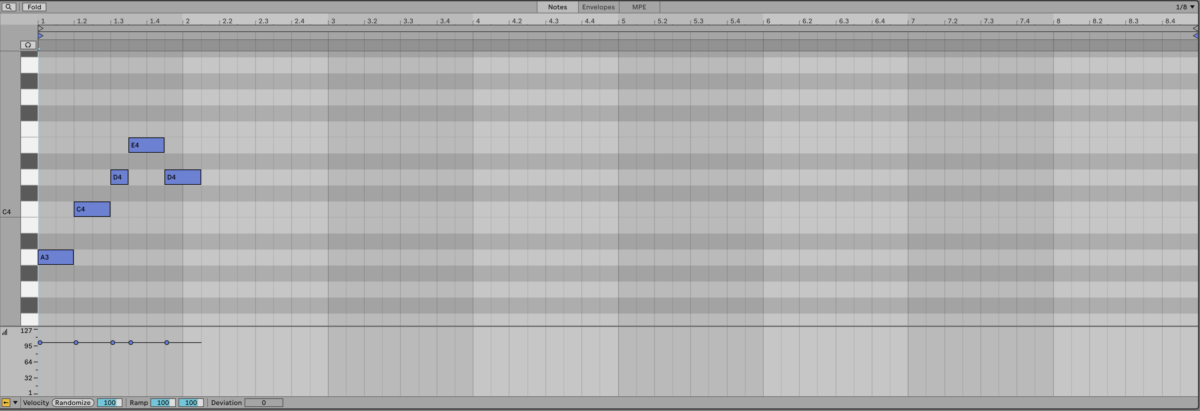
The motif
Native Instruments · 02 The motif
This motif plays A, C, D, E, and D again, so we’re simply using the keys of the scale in order, missing out B.
Rhythmically, this motif is simple too: all these notes play for a quarter note, apart from the first D, which plays for an eighth note.
You’ll also notice that currently there’s no expressive velocity variation, as each note has a velocity of 100. This is something we’ll add later.
3. Developing the melodic idea
We can develop our motif into a melody using repetition and variation. Let’s duplicate out the motif, this time changing the final note from D to C.
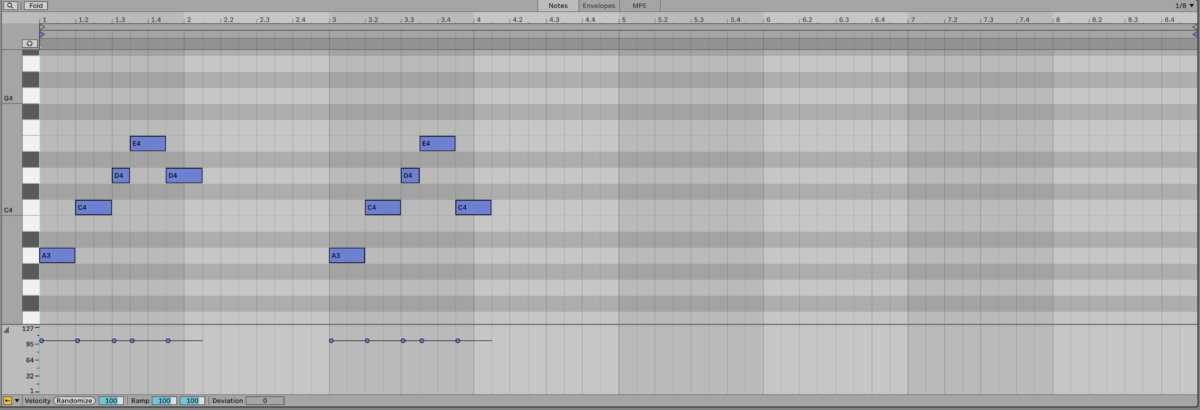
Duplicating the motif
Native Instruments · 03 Duplicating the motif
This change is small. We’re only moving the final note down a single step, yet it creates a wistful feeling. You probably expected to hear the fourth note of the scale again, but instead you get the third, and that subtle shift replaces resolution with something more sombre.
This is emotional melodic writing in a nutshell: while it’s impossible to measure such feelings scientifically, it’s fair to say that the unexpectedly lower note evokes a gentle sense of melancholy.
Let’s continue to explore the melodic possibilities with another variation on our motif. This time we’ll keep the same rhythm, but vary up the pitches a bit more with A, C, F, E, and D.
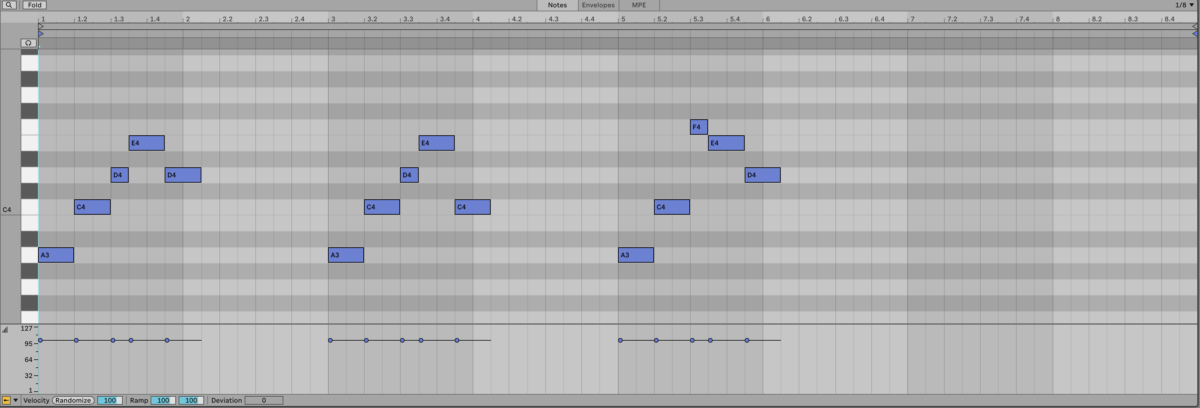
Further variation of the motif
Native Instruments · 04 Further variation of the motif
This time we’re switching things up with a bigger leap from the third to the sixth step of the scale, C to F. Introducing F adds a fresh color to our palette of tones and expands the melody’s emotional range. The movement from F to E is downward, which is a contrast to the upward movement of the motif.
Let’s subvert the motif further with a third variation. This time it will play F, E, C, D, and A.
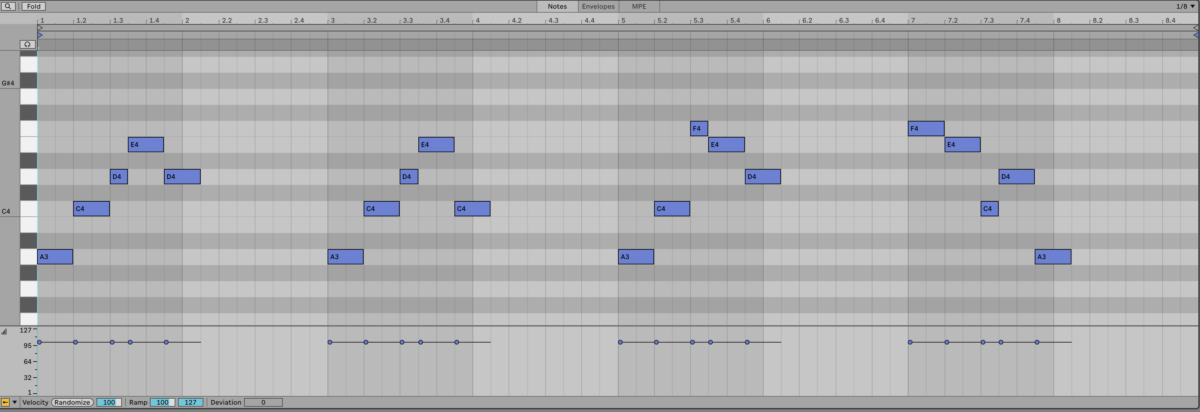
A final variation of the motif
Native Instruments · 05 A final variation of the motif
The rhythm of this variation is identical to the earlier versions, but instead of starting on the first degree of the scale and moving upward, we begin on the sixth and move mostly downward. This shift gives the phrase a different mood from the previous variations, resolving neatly on the first degree of the scale.
4. Adding dynamic feeling
Currently, every note in our melody has the same velocity and perfect timing. While making small adjustments to the timing is possible, in this case, it’s not going to change the feel of the melody too much, as it’s quite slow and sombre anyway. In other words, the consistency in timing doesn’t particularly stand out as unnatural.
However, it is certainly worth giving the part a more natural feel in terms of velocity, as this will give us a noticeable impact in terms of its emotional feel.
Let’s edit the notes’ velocity values so that we get something of a swelling volume in each variation on the motif.
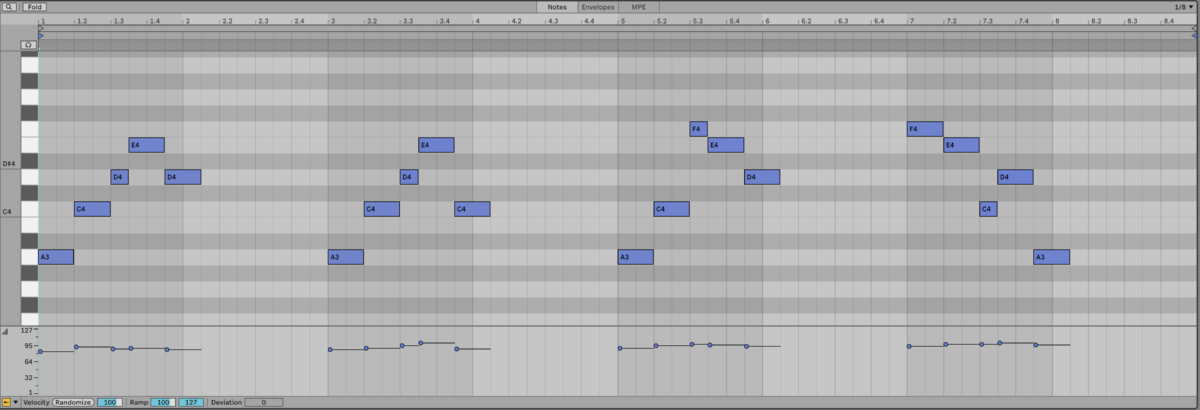
Varying the notes’ velocity
Native Instruments · 06 Varying the notes’ velocity
Adjusting the notes’ velocity with a degree of intentionality and attempting to emulate something a human being might actually play gives us better results than simply changing the velocity values at random, and our melody now has a more natural, expressive feel.
You can achieve a similar effect with the Humanizer Tool in Kontakt.
5. Enhancing the emotion with ambience
Both mixing and sound design can have a big impact on how a musical part resonates emotionally, and arguably, the king of emotion-enhancing effects is reverb. Reverb is a naturally occurring effect that we hear all the time in real life, and perhaps it’s this natural quality that makes it so evocative.
Add Raum reverb to the MIDI track, and select the Large > Sentimental preset.
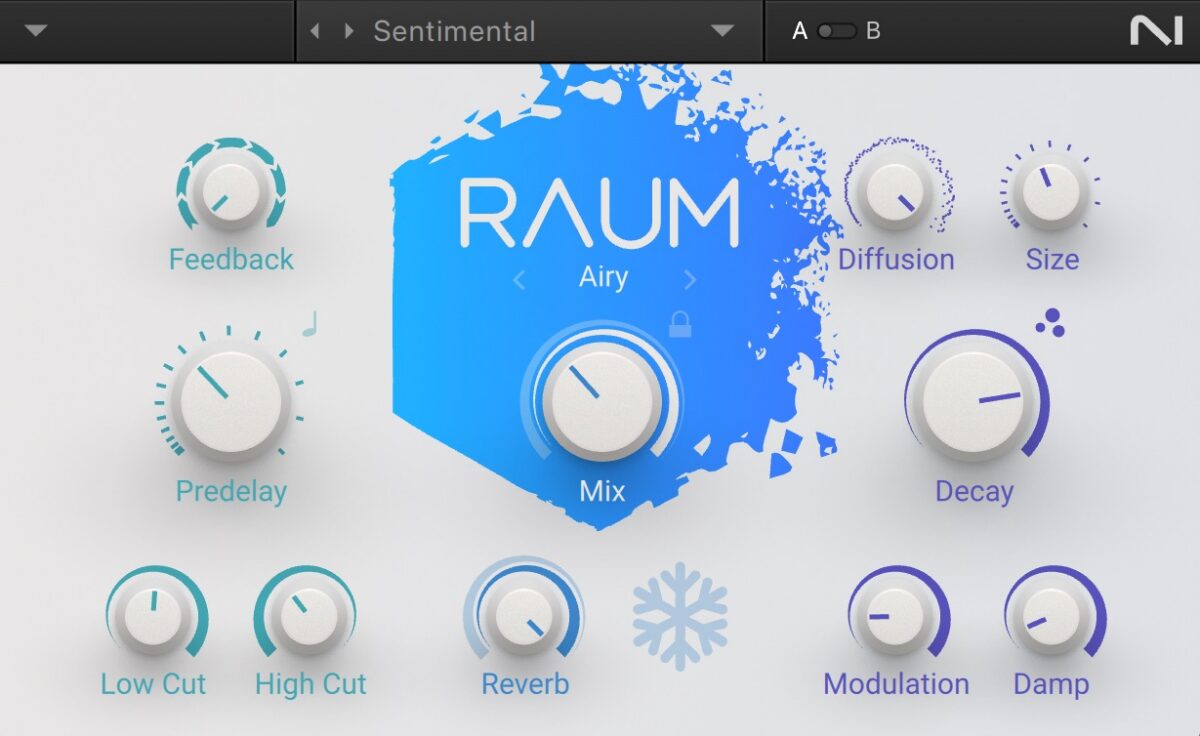
The Sentimental preset
Native Instruments · 07 Piano with reverb
This long, vibey reverb allows the notes to mingle together, giving us a richer, more ethereal feel that enhances the emotion inherent in the melody.
Beyond the melody: Adding chords
Once you’ve created a heartbreaking melody, you’ll probably want to hear how it sounds with a sad chord progression, and even if you’re not particularly savvy when it comes to music theory, it’s possible to create an accompanying chord progression using the notes in the scale.
Here we’ve used the tonic chord of A minor (A, C, E) followed by G major (G, B, D), E minor (E, G, B), and F major (F, A, C).
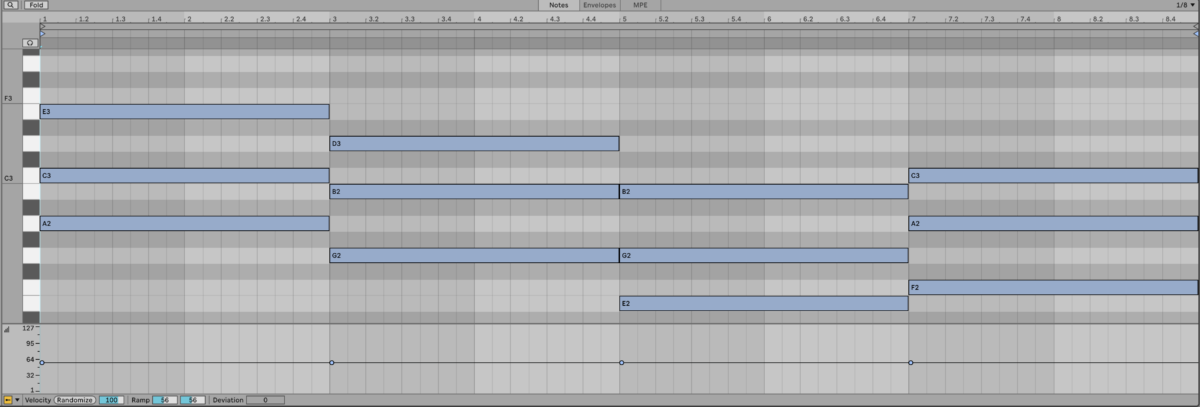
Accompanying chords
To play this, we’ll use the Agonic Drone preset from Massive X, which gives us a lush, sustained tone. Massive X pads are a perfect way to create a melancholic ambiance.
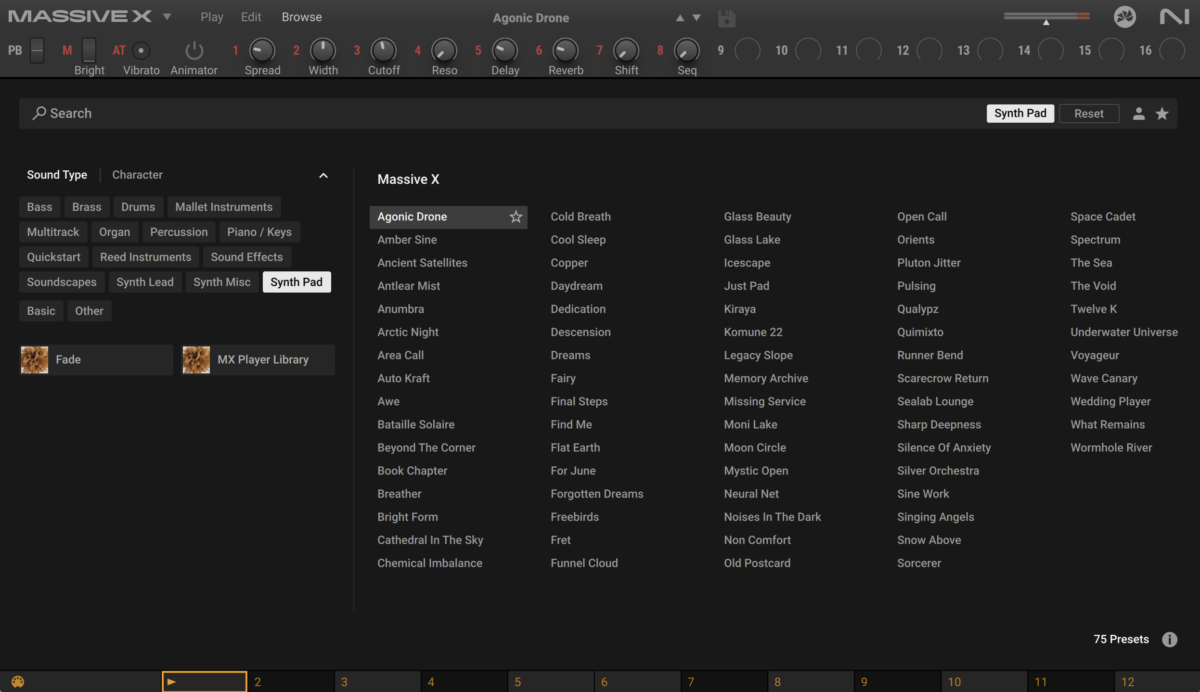
The Agonic Drone preset
Native Instruments · 08 Piano and pad
Trying out different sounds
What we have thus far is subtle and understated. Let’s hear how we can get a different feeling using some of the other sounds available in NI 360 Essentials.
First, let’s swap out the piano with the Fade Black Dawn preset from Analog Dreams.

The Fade Black Dawn preset
Native Instruments · 09 The Fade Black preset
Raum is still giving this sound a long, lush tail, but we can enhance the attack with Transient Master. Add the effect before Raum in the signal chain, and turn the Attack up to 20%.
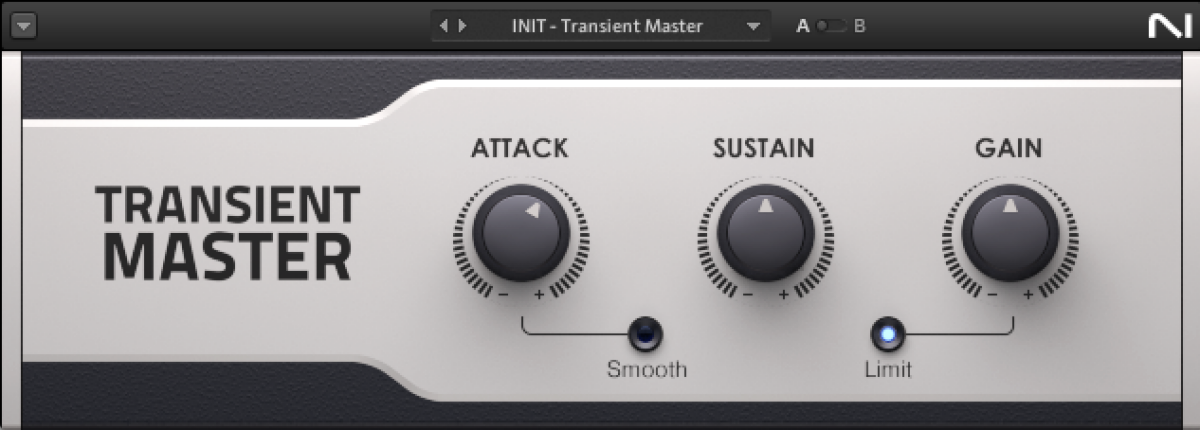
Adding attack with Transient Master
Native Instruments · 10 Adding attack with Transient Master
Now replace the Massive X pad with Navigator, also from Analog Dreams.

The Navigator preset
Native Instruments · 11 The Navigator preset
We can use Transient Master to bring up the tail of this synthwave-style pad and make it louder for longer. Add Transient Master and turn its Sustain up to 100%.
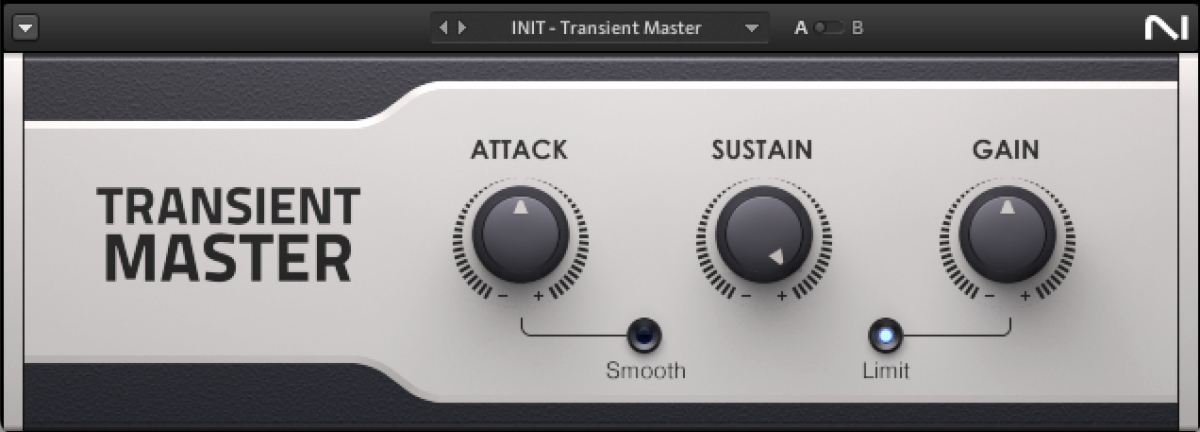
Adding sustain with Transient Master
Native Instruments · 12 Adding sustain with Transient Master
Let’s hear how these new versions of the sounds work together.
Native Instruments · 13 The new versions playing together
This new version retains the emotional core of the original version, but gives it an alternative synthetic aesthetic that’s ideal for say, a futuristic video game soundtrack.
Start composing emotional melodies with NI 360 Essentials today
In this guide, we’ve used songwriting tips to see how you can create a piano motif, develop it into an emotional melody, and add Massive X to give it some atmosphere. We also created an alternative version using synthwave sounds, all with NI 360 Essentials.
Load up your favorite instruments from NI 360 and start creating your own emotional melodies today.
Try for free